The premise, reveals, character knowledge, episode objectives, and season hook were established before video generation.
AI MICRO-DRAMA PRODUCTION SYSTEM
Build short-form series that remember what happened before the next prompt.
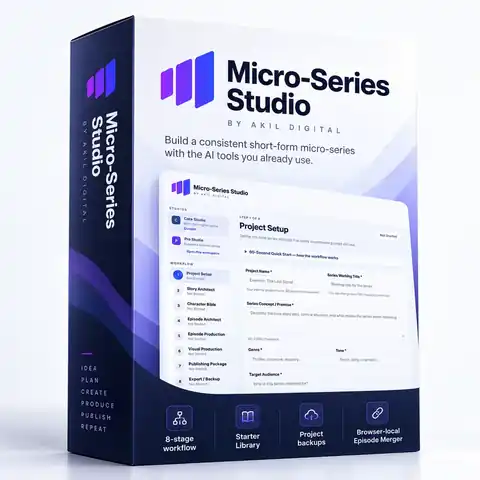
Micro-Series Studio is not another prompt pack. It is a guided production system for turning one story idea into an organized, continuity-aware micro-series — from Series Bible and character canon through episode production, visual references, clip-by-clip generation guidance, publishing assets, backup, and final MP4 assembly.
✓Plan before you generate with a Series Bible, Character Bible, season architecture, and episode packages.
✓Protect identity, props, location, and story state instead of asking the video model to reinvent them every clip.
✓Produce one episode and one clip at a time with queues, acceptance states, continuity modes, and clear next actions.
✓Use the AI tools you already prefer — ChatGPT, Claude, Gemini, and compatible creative tools — without a Micro-Series Studio API subscription.
✓Bring approved clips back into the app and assemble the finished episode with the included browser-local Episode Merger.
Get Micro-Series Studio — $27
One-time Micro-Series Studio purchase. External AI and video-generation tools may have their own costs, credits, or usage limits.

One project. One source of truth.
Approved decisions carry forward instead of being re-invented at every step.
1Project SetupDefine the series
2Story ArchitectBuild the Series Bible
3Character BibleLock identity + behavior
4Episode ArchitectPlan the season
5Episode ProductionProduce each episode
6Visual ProductionReferences + source clips
7Publishing PackagePrepare each release
8Export / BackupProtect + archive the project
INCLUDED PRODUCTION TOOL
Episode Merger
Arrange approved clips → preview the sequence → download one finished MP4
Browser-local
WATCH MICRO-SERIES STUDIO IN ACTION
See the redesigned guided workflow before you buy.
This walkthrough shows the actual application moving from project setup to saved canon, episode production, visual references, clip execution, publishing, backup, and Episode Merger.
Micro-Series Studio demo video unavailable
The video preview could not load in this browser.
REAL FLAGSHIP PRODUCTION · NOT A MOCKUP
The Red Notebook was built through the actual Micro-Series Studio workflow.
This three-episode mystery demo is the proof of what the system is designed to do: organize the story, preserve production truth, control visual continuity, move the plot forward deliberately, and give the creator a practical generation workflow instead of a pile of disconnected prompts.
The Red Notebook — Complete Flagship
The video preview could not load in this browser.
3 episodes · 6 source clips · one continuous café encounter
The Red Notebook — Complete Flagship Sequence
A stranger knows Maya's name. A worn red notebook connects him to the mother who vanished twenty years ago. Across three short episodes, the notebook moves from Daniel to Maya while the story moves from distrust, to emotional reversal, to present-tense danger.
WHAT TO WATCH FOR
This is continuity doing actual production work.
Maya and Daniel retain recognizable faces, hair, wardrobe, and performance identity across the sequence.
The red notebook is not decoration. Its ownership is tracked as story state: Daniel → transfer → Maya.
The same café, table relationship, rainy-night atmosphere, and character geography carry across multiple source clips.
Each episode reveals one new layer without prematurely spending the next episode's twist or adding unrelated spectacle.
The system preserves canon without pretending the creator is a robot. Final production used handoff frames where continuity demanded them and included two small dialogue refinements.
That is what Micro-Series Studio is actually selling.
Planning. Identity continuity. Prop continuity. Scene continuity. Controlled story progression. A repeatable production process — not merely prompt generation.
SEE THE ACTUAL APPLICATION
Real Micro-Series Studio screens. Clear enough to inspect.
These showcase graphics use real production screens from the completed demo project. The eight-stage workflow stays intact, and the included Episode Merger adds a separate production tool for turning generated scene clips into the finished episode MP4.
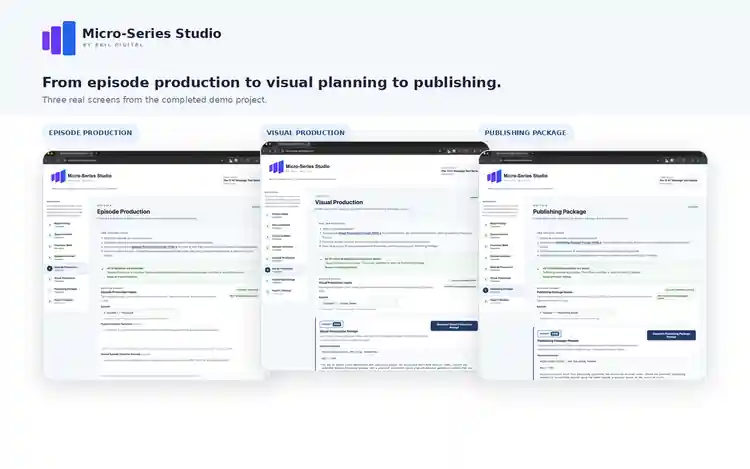
WORKFLOW SHOWCASE
Episode Production → Visual Production → Publishing Package
The showcase image is waiting for its repository asset.
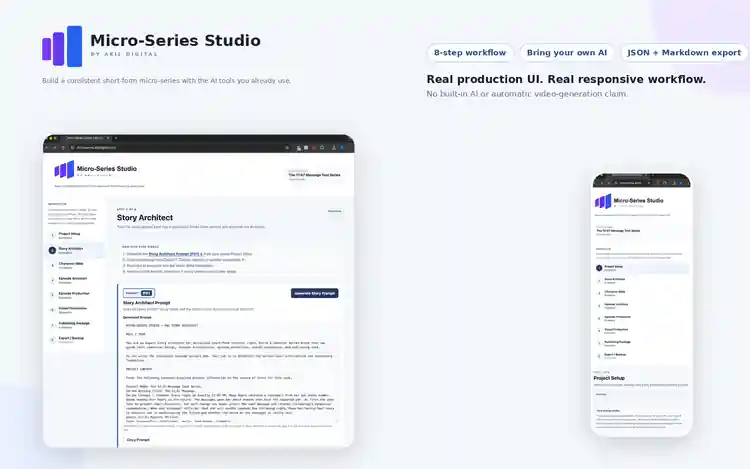
DESKTOP + MOBILE
Real production UI. Real responsive workflow.
The responsive showcase image is waiting for its repository asset.
Plus: Episode Merger is built into the application.
The core workflow gets you from idea to production-ready scene direction. Episode Merger brings the generated clips back into Micro-Series Studio so you can assemble, preview, and download the finished episode.
Included
THE PROBLEM ISN'T GETTING AI TO GENERATE SOMETHING
The hard part is getting the next scene to remember the production you already built.
A general AI chat can write a scene. A video model can generate a clip. But a serialized project starts breaking when the face changes, wardrobe drifts, a prop jumps to the wrong character, the camera forgets the room, a later episode reveals something too early, or a new prompt silently resets the state you worked to establish.
Faces, hair, wardrobe, voice, behavior, and relationship state can change from generation to generation.
Story-critical objects move, disappear, change design, or reset to the wrong place while the location quietly reshuffles around them.
A character suddenly knows something that has not been revealed yet, or an AI burns the next cliffhanger too early.
Prompts, clips, references, scripts, captions, retries, and backups scatter across tools with no clear production state.
ONE CONTROLLED WORKFLOW FROM IDEA TO FINISHED EPISODE
Micro-Series Studio gives every stage a job — and makes later stages inherit what you already approved.
You still make the creative decisions and use the AI tools you prefer. MSS supplies the structure: it turns approved upstream work into the context for the next stage, then guides the project episode by episode and clip by clip so production does not keep resetting itself.
Project Setup
Define premise, working title, genre, tone, audience, platform, episode count, target length, dialogue preference, visual style, and ending direction.
Story Architect
Generate a structured Series Bible with premise, conflict, stakes, roles, series arc, turning points, escalation logic, ending logic, and locked continuity rules.
Character Bible
Lock character identity, appearance anchors, wardrobe logic, personality, behavior, speech, relationships, emotional progression, and ensemble continuity.
Episode Architect
Map the configured season before writing individual episodes, including hooks, objectives, escalations, reveals, cliffhangers, and carry-forward state.
Episode Production
Produce one episode at a time. Each episode gets its own scenes, complete script, closing beat, bridge, continuity facts, and next-episode summary.
Visual Production
Stage reusable references first, then turn each episode into production-ready source clips with continuity mode, coverage, state, blocking, prompts, provider settings, review, acceptance, and retry flow.
Publishing Package
Create multiple title and hook options, caption copy, thumbnail text, CTAs, relevant hashtags, a next-episode teaser, and practical publishing notes.
Export / Backup
Save the editable project as JSON and generate a human-readable Markdown production package for archiving, reference, collaboration, or handoff.
INCLUDED PRODUCTION TOOL
Episode Merger closes the loop
Generate source clips with your chosen external video tool, then bring 2–12 clips back into Micro-Series Studio. Reorder them, preview the full sequence, and download one finished MP4 without uploading the source clips to Akil Digital servers.
Source clips
→
Finished MP4
THE WORKFLOW WAS REBUILT AROUND ACTUAL PRODUCTION
The redesigned UI tells you what to do now — without hiding the detail you may need later.
The latest Micro-Series Studio interface is not a collection of giant text boxes. The workflow now separates creation, review, production state, and advanced detail so a first-time user can move forward without losing access to the underlying material.
Focused review instead of a wall of AI text
After structured output is saved, Guided view breaks the material into sections, characters, episodes, or clips so you can review one useful unit at a time.
Full document access when you want it
The raw saved output is still available for deeper review and editing. Advanced controls are kept out of the way until there is actually something to review.
The interface stops inviting actions that do nothing
Buttons, view modes, continuation actions, and production controls are enabled as the required project state becomes available instead of appearing active before they have a function.
Each episode keeps its own production package
Episode Production no longer treats the season like one giant document. Select an unfinished episode to create it, or a completed episode to review its saved dashboard.
Establish reusable production truth before clips
Characters, environments, hero props, fidelity contracts, creation guidance, and approval state are staged before episode-level video work begins.
Produce the episode one source clip at a time
Each clip exposes its purpose, continuity mode, coverage type, duration, references, opening state, blocking, motion, performance, dialogue, audio, and required ending state.
MSS turns the neutral plan into practical generation instructions
For the currently supported Google Flow / Veo workflow, MSS renders the appropriate reference guidance, Frames/Ingredients strategy, aspect ratio, supported duration, starting-frame logic, and video prompt from the saved clip package.
A generation is not canon just because you clicked Generate
MSS distinguishes planned, generated, accepted, and retry states. You review the result, accept it when it works, or record failure reasons and generate a targeted retry.
CONTINUITY-SENSITIVE START-FRAME LOGIC
Same scene? Continue from the accepted ending frame.
When the next clip is a true continuation of the same scene and immediate state, MSS now plans for the prior accepted ending frame to become the next start frame. That protects character placement, props, lighting, and environment instead of unnecessarily rebuilding the shot from a fresh image.
Clip N accepted
→
Save ending frame
→
Clip N+1 start frame
Fresh starter images still have a job: use them when the next clip intentionally begins a genuinely new visual setup, such as a new location, materially different blocking, or a shot that should not inherit the previous frame composition.
WHAT YOU ACTUALLY GET
A working production application — not another PDF full of prompt templates.
Core Studio combines structured AI prompting, saved canon, guided review, per-episode production, continuity-aware visual planning, publishing preparation, portable backup, and browser-local episode assembly.
- Project Setup for the series-level creative brief.
- Story Architect (P01) for the Series Bible and locked story rules.
- Character Bible (P02) for identity, performance, relationship, and ensemble continuity.
- Episode Architect (P03) for season-wide episode planning before individual production.
- Episode Production (P04) with an episode queue, individual production dashboards, complete scripts, bridges, and continuity facts.
- Visual Production (P05-A + P05-B) for reusable references, clip plans, provider guidance, start/handoff-frame logic, visual checks, acceptance, and retries.
- Publishing Package (P06) for episode titles, hooks, captions, thumbnail text, CTAs, hashtags, teasers, and notes.
- Guided + Advanced views so new users can stay focused while experienced users can inspect the full saved output.
- State-aware completion tracking so later actions stay gated until required upstream work exists.
- Editable saved canon — review and refine AI output before later steps inherit it.
- JSON backup / restore for protecting the editable browser-local project.
- Markdown production export for a readable portable project reference.
- Episode Merger for browser-local clip ordering, preview, merge, and MP4 download.
- Quick Start Guide that explains the complete workflow and backup responsibilities.
- Bonus: 12 ready-to-use starter projects with Project Insights and customizable setup fields.
LOCAL EPISODE ASSEMBLY INCLUDED
Generate the scenes anywhere. Finish the episode inside Micro-Series Studio.
After your video tool creates the individual scene clips, bring them back into Episode Merger. Arrange the story order, preview the sequence, and download one finished MP4 — without uploading the source clips to Akil Digital servers.
2–12 clips
Browser-local processing
MP4 output
- Drag, drop, and reorder MP4, MOV/M4V, and WebM clips.
- Preview the full sequence before creating the final file.
- Fast Merge preserves compatible source media without unnecessary re-encoding.
- Compatibility Merge normalizes differing media settings when needed.
- Finished-output preview + Download Again keeps the final assembly workflow inside the app.
Important: Episode Merger assembles video clips; it does not generate AI video scenes. Use the image, video, voice, and editing tools you prefer to create the source media.
TOOLS
Episode Merger
Browser-local
1
scene-01.mp400:15 · 9:16
Move ↓2
scene-02.mp400:15 · 9:16
Move ↑3
scene-03.mp400:15 · 9:16
RemoveTotal episode00:45
Preview Episode
Merge & Download Episode
LAUNCH BONUS · 12 READY-TO-USE PROJECTS
Don't start with a blank Genre box. Start with a complete micro-drama premise.
Open the in-app Starter Library, explore the Project Insights, choose a foundation, and load it with one click. Each project already includes a title, premise, trope stack, tone, audience, platform, episode count, target length, dialogue preference, visual style, and ending direction — and every field is completely customizable.
Billionaire Romance + Secret CEO
Contract Marriage + Hidden Heiress
Revenge + Secret Heiress Comeback
Rejected Mate + Hidden Alpha
Rebirth Revenge + Second Chance
Time Travel Mystery + Conspiracy
And six more: Secret Baby, Mafia Romance, Long-Lost Heiress, Hidden Genius, Family Betrayal, and Double-Life Mystery.
12
Micro-Drama Starter Projects
Built directly into Micro-Series Studio. Choose, customize, and continue through the same production workflow without leaving the app.
- One-click in-app loading
- Project Setup pre-filled and completely customizable
- Collapsible Project Insights with conflict, cliffhanger, and customization guidance
- Downstream creative stages left open for your original series
- Included with the front-end purchase
KNOW EXACTLY WHAT YOU'RE BUYING
Micro-Series Studio is the production operating system. Your AI tools remain the creative engines.
That separation is intentional. You are not locked into a proprietary text model or forced to buy video credits from us.
Micro-Series Studio does
- Preserve approved story, character, episode, and production context
- Build structured prompts from saved project state
- Guide episode-by-episode and clip-by-clip production
- Track canonical references and continuity-sensitive state
- Render provider-aware execution guidance for supported workflows
- Track generated, accepted, and retry states
- Assemble 2–12 source clips into one finished episode MP4
- Export editable JSON backups and readable Markdown packages
You bring
- A compatible AI assistant for the generated planning/production prompts
- Your chosen image, video, voice, and optional editing tools
- Generation access or credits required by those external services
- Your creative judgment — including small dialogue, pacing, framing, or take-selection decisions
- Your publishing accounts and distribution process
WHO IT'S FOR
Built for creators who want a system, not a blank chat window.
Short-form storytellers
Plan serialized fiction for TikTok, Reels, Shorts, and other vertical-video formats.
AI content creators
Give your existing AI tools a disciplined project structure instead of improvising every prompt.
Faceless-channel builders
Develop story-driven content without making your own on-camera presence the center of the workflow.
WATCH THE STORY PROGRESSION
Three Red Notebook episodes. Then a completely different Billionaire/CEO sample.
The point is not that every story should look the same. The point is that the same workflow can preserve the production rules that matter inside very different story lanes.
Episode 1 video preview unavailable
He Knew Her Name
Daniel begins seated with the notebook on his side. Maya remains standing and skeptical. The episode establishes identity, location, prop ownership, and the first credibility reveal.
Episode 2 video preview unavailable
She Didn't Leave
Both characters are seated. The story reverses Maya's belief about her mother, then the notebook physically crosses the table and changes possession exactly once.
Episode 3 video preview unavailable
They Found Me
The notebook remains with Maya. Daniel's first environment-directed concern shifts the mystery from old family history into a present-tense threat without showing a villain.
The Billionaire CEO video preview unavailable
A DIFFERENT STORY LANE · THE SAME PRODUCTION DISCIPLINE
The Billionaire CEO
This video is Episode 1 of a 15-episode story. It is shown here as the opening episode, not as the complete series.
This finished sample moves away from the intimate mystery-thriller tone of The Red Notebook and into the high-interest Billionaire / Secret CEO lane represented in the Starter Library.
The advantage is not a single genre template. It is the repeatable production structure underneath the genre: define canon, lock characters, architect the episode, preserve continuity, generate with intent, review the result, and package the finished release.
Different trope stack
Different visual tone
Same structured workflow
Same creator control
Production reality matters:
Micro-Series Studio did not generate these AI video frames on Akil Digital servers. External media tools created the source footage. MSS supplied the planning, canon, continuity structure, clip guidance, review state, and finishing workflow used to keep the project organized.
MICRO-SERIES STUDIO · CORE
Build the series. Preserve the production truth. Finish the episode.
- Micro-Series Studio Core browser application
- Full 8-stage guided production workflow
- Guided + Advanced review modes
- 6 structured external-AI prompt systems (P01–P06)
- Series Bible + Character Bible canon workflow
- Episode Architect + episode-by-episode Production queues
- P05-A reusable Reference Setup
- P05-B clip-by-clip Episode Visual Production
- Continuity modes + accepted ending-frame handoff workflow
- Provider-aware Google Flow / Veo execution guidance
- Generation review, acceptance, and retry states
- Per-episode Publishing Packages
- JSON project backup / restore
- Human-readable Markdown production-package export
- Browser-local Episode Merger for 2–12 clips
- Quick Start Guide
- Bonus: 12 ready-to-use in-app Starter Projects
Launch price
 Secure checkout and payment processing provided by WarriorPlus. External AI/video services are separate.
$27
one-time purchase
No Micro-Series Studio subscription
No API key required for the Core copy/paste workflow
Use compatible AI tools you already have
Buyer access delivered through WarriorPlus
FREQUENTLY ASKED QUESTIONS
Before you buy
Is Micro-Series Studio just a prompt generator?
No. Prompt generation is one part of the system. MSS also preserves saved canon, tracks episode completion, stages reusable visual references, turns episodes into individual source clips, tracks continuity mode and production state, provides supported-provider execution guidance, manages review/accept/retry flow, creates publishing packages, exports project data, and includes Episode Merger for final clip assembly.
Does Micro-Series Studio generate AI video scenes itself?
No. You use the image/video tools you prefer to create the source media. MSS plans and organizes that production, renders practical prompts/settings for supported provider workflows, and then lets you bring the approved source clips back into Episode Merger.
Why use handoff frames instead of making a new starter image for every clip?
If the next clip is a direct continuation of the same scene, the accepted ending frame of the previous clip is usually the strongest start frame because it preserves the exact visual state you already approved. MSS now treats fresh starter images as the better choice when the next clip intentionally begins a genuinely new visual setup.
Does MSS include its own AI model or API credits?
No. Core Studio is designed around a transparent copy/paste workflow with a compatible AI assistant such as ChatGPT, Claude, Gemini, or another tool that can handle the generated structured prompt. External providers maintain their own subscriptions, credits, and usage limits.
What does "provider-aware" mean?
The saved visual plan is provider-neutral. For currently supported Google Flow / Veo production, MSS converts that plan into practical execution guidance such as reference strategy, Frames/Ingredients mode, start-frame handling, aspect ratio, supported duration, and the video prompt. This is guidance for using the external provider — not an API integration or included video subscription.
Can I rely on free video-generation credits for a polished series?
Do not assume a free allowance will cover serious production. Real video generation often requires retries and alternate takes before you accept a clip. Plan according to the pricing and credits of the external provider you choose.
Can I edit what the AI gives me?
Yes. You review the returned material before it becomes saved project canon. The finished Red Notebook demo also included two small dialogue refinements during production — an example of the creator retaining judgment while the system preserves the larger continuity.
What are Guided and Advanced views?
Guided view presents saved structured output as focused sections, characters, episodes, or clips so you can work without scrolling through a huge document. Advanced view keeps the full saved output available when you want deeper review or editing.
How many episodes can a project contain?
The current Core workflow supports projects with 3–30 configured episodes and target episode lengths from 15 seconds through 180 seconds.
Where is my project stored?
The active project is stored locally in your browser. MSS includes JSON backup and restore because browser data can be cleared or lost. Export backups regularly if the project matters.
What is the difference between JSON backup and Markdown export?
The JSON file is the editable restore format used to reopen the project in Micro-Series Studio. The Markdown production package is a human-readable reference for archiving, collaboration, or copying material elsewhere. Markdown cannot restore the editable project.
What does Episode Merger do?
Episode Merger takes 2–12 video clips you already generated, lets you order and preview them, then merges them into one downloadable MP4 in the browser. It does not generate the AI video scenes.
Are there recurring Micro-Series Studio fees?
The Core front-end product is a one-time purchase. External AI, image, video, voice, editing, or publishing services may have their own separate fees or usage limits.
Is Pro Studio included in the $27 Core purchase?
No. The $27 offer is Micro-Series Studio Core. Pro Studio is presented separately as an optional upgrade. Core remains a complete usable workflow on its own.
Stop rebuilding your series from prompt to prompt — and stop leaving the workflow just to stitch the final episode.
Keep the story decisions connected from the first idea through the publishing package, then bring your generated scene clips back into Micro-Series Studio and download the finished MP4.
Get Micro-Series Studio — $27